
The Civic IQ MCP server puts 100,000+ agencies inside your chat window
Civic IQ tracks board meetings, vendor spend, and buying signals from 100,000+ public agencies before RFPs are posted. The MCP server means you can ask about any of it without leaving Claude or ChatGPT.
> What districts in Texas are talking about submetering?
→ connecting to civic-iq-mcp...
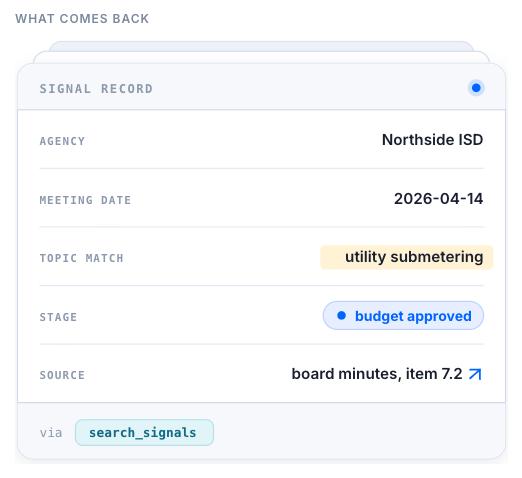
Searches board meeting signals matching your topic and state
Results are labeled by stage: early discussion, budget approved, or RFP imminent
Add it once, query it anywhere you already work
The MCP server sits between your assistant and Civic IQ's live agency data. No dashboard tab, no separate login. You ask, it answers, using the same data your CS and sales teams already see in the platform.
Claude
Add the Civic IQ MCP server as a connector in Claude and ask about an agency, vendor, or category in a normal chat.
ChatGPT
Connect the same server as a custom connector or GPT action to bring agency signals into your existing ChatGPT workflows.
Custom agents
Point any MCP-compatible agent framework at the endpoint to pull structured signal data into your own tools.
What is an MCP server?
MCP, the Model Context Protocol, is an open standard for connecting an assistant to an outside data source. A server implements the protocol and advertises a set of tools; any compliant client can discover and call them.
Civic IQ runs one, so Claude, ChatGPT, and any other MCP client can query our agency data directly instead of you exporting it first. The client never learns our API. It reads the tool list the server offers and asks in plain language.
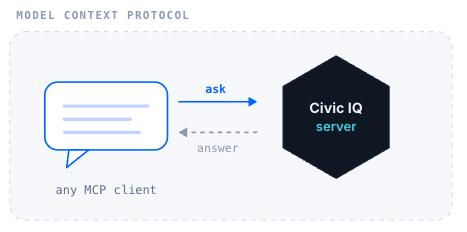
What happens when you ask a question?
Four hops, none of which you manage. The assistant decides a tool is needed, calls it, and reads the answer back into the conversation.
Stages in the buying process
Every signal comes back with where the agency is in its own process, so the assistant can tell you what is worth a call this quarter and what is not yet real.
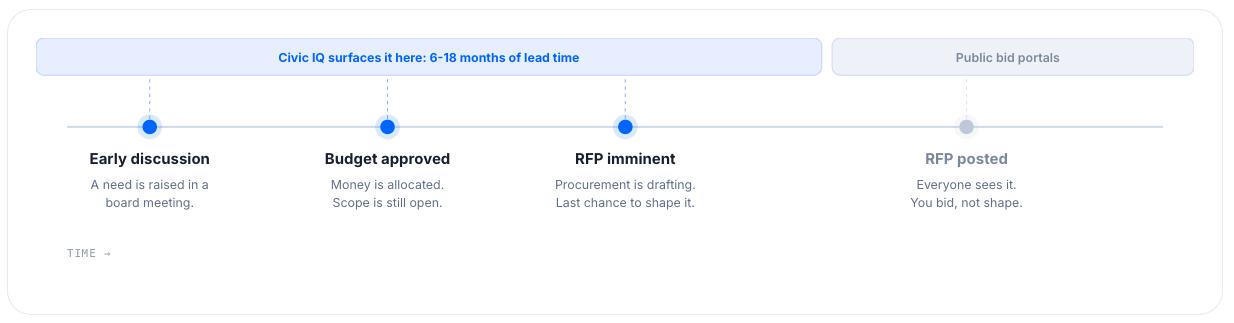
Early discussion
A need is raised in a board meeting.
Budget approved
Money is allocated. Scope is still open.
RFP imminent
Procurement is drafting. Last chance to shape it.
RFP posted
Everyone sees it. You bid, not shape.
Five tools, one connection
Each of the pages below documents one angle on this data. The tools below are the ones actually exposed on the Civic IQ MCP server today.
> search_signals
Board meeting monitoring across 100,000+ agencies, filterable by topic, state, agency type, and stage. Covered in detail on the Public Meetings and Pre-RFP Signals pages.
> find_vendors
Look up which vendors serve a given category or agency. See Government Spending MCP.
> discover_contracts
Awarded contract data, read forward as market and renewal intelligence. See Contract Renewal MCP.
> get_contacts
Named decision-maker contacts at an agency, pulled directly into your chat.
> search_vendor
A broader cross-source sweep on a specific vendor name, useful when a category search comes back sparse.
How do you connect the Civic IQ MCP server?
One endpoint, added once. Pick your client and follow the three steps.
New to Civic IQ? Create your free account first. It takes a minute, and you'll get the connect steps right after.
Server URL
https://beta.mcp.civiciq.com/mcpChoose your client
Add it as a connector in Claude
- 1
Open Settings → Connectors in Claude and choose Add custom connector.
- 2
Paste the Civic IQ endpoint and authorize with your Civic IQ account.
- 3
Ask about an agency, vendor, or category in a normal chat. Claude calls whichever tools the question needs.
Free to start. Existing Civic IQ users sign in with their account, and the server returns only what that account can already see.
What can it see, and what can it change?
The short answer: it reads, and only what you could already read.
Read-only by design
The server exposes queries, not writes. Nothing in your Civic IQ account can be changed from a chat window.
Your permissions carry over
It answers as your account. If you can't see an agency in the platform, the assistant can't either.
Calls stay attributable
Every tool call is tied to the account that made it, so admins can see what was asked and when.
What can you ask it?
Plain language, the way you would brief a new rep. No query syntax, no tool names.
“Which districts in Texas are talking about submetering?”
Board meeting signals matching the topic and state, each labeled by stage.
“What changed on my accounts this week?”
Recent meeting activity across the agencies you follow, newest first.
“Who are the decision makers at this agency?”
Named contacts with notes, from the same records your CS team works from.
“When does the incumbent contract come up for renewal?”
Awarded contract data read forward, so you know the window before it opens.
“Which agencies in this state buy in my category at all?”
Vendor and spend history, so you can size a territory before you work it.
Where else does this data show up?
FAQ
Civic IQ MCP server FAQ
Yes. The MCP server draws on the same signal engine your CS and sales teams use inside Civic IQ. It's a different way in, not a different dataset.
Yes. The server is standard MCP, so it connects to Claude and ChatGPT as a connector, plus any other MCP-compatible client.
No. Once it's connected, you ask questions in plain language the same way you'd talk to any of these assistants.
Live RFP and RFQ tracking is part of Civic IQ's other tools. If you need that specifically, see the RFP & RFQ Tracking page for how it's accessed.
Connect it to your assistant
Paste the endpoint and ask about 100,000+ agencies from the chat window you already have open. Or have us walk it through on your own accounts.